Posts

Showing posts with the label Role Based Permissions

Permission Roles - Understanding System Security
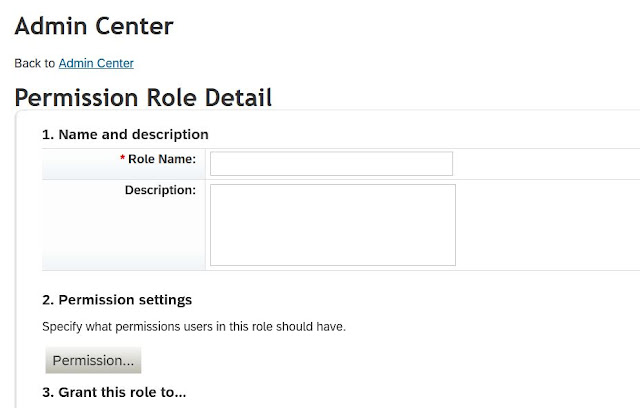
Image
  What does an Employee, a Manager, or an Administrator see when s/he logs on to SAP SuccessFactors is determined by set of permissions assigned to his/her role.  Permission Roles are defined through Manage Permission Roles tool. Here you can modify existing roles and also Create new .  In Permission Settings , you can select/deselect the permissions. Depending on the modules enabled within your instance, User and Administrator Permissions can be set up.  Here's an example of  Admin Center Permissions . After defining the permissions, you can grant the role to relevant Permission Group, from Grant this role to... You can select an already defined Permission Group for such an assignment.  Don't you think setting up Permission Roles is also very easy? Happy learning!
Permission Groups - Understanding System Security

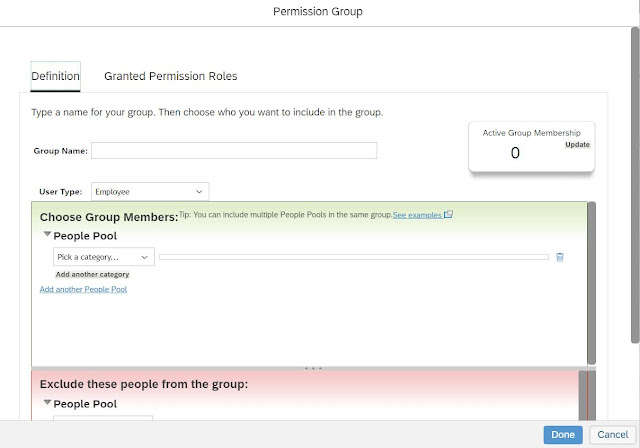
Image
  SAP SuccessFactors users who need to have similar permissions to access system can be dynamically grouped.  For instance , you can group people based in a particular location, or working in a specific department or division. The benefit of doing so is you don't need to manually assign permissions when there's a change in organizational structure. Anyone who meets the criteria, you have defined, is automatically granted the permission(s).  A Security Administrator who has access to Manage Permission Groups tool can create a new group or modify an existing one.  By choosing Create New , you go to Permission Group screen where you can define your criteria to include people, for instance, people from a particular country . At the bottom of the same screen, you can also exclude people from the list - who should not be selected, for instance, a city .  Here's an example; Your company has a subsidiary in Indonesia. It has offices in different cities and its Jak...